How to Create An Account on Netfly? (Detailed Guide)
Have you just figured out Netfly and are wondering how the app works and the right way to use it to get the most out of it? Well, this guide gets you to dive deep into it to get a realistic expectation of what you get with this app. We will mainly focus on how to create an account on Netfly and configure the app on a compatible device to get access to its entire content library.
What is Netfly App?
Netfly app is a free entertainment app that has an interface that resembles the Netflix platform but has some different features of its own. What sets Netfly apart from other apps and even Netflix is that it can stream live telecasts of real-time sports, news and other channels across the world. This is what makes the app unique, besides holding an extensive library of cinema. It is compatible and can be run on any operating system, such as Windows, Android, iOS, Fire TV Stick, and others.
It has a smart video quality adjustment feature that changes video resolution based on your internet speed to ensure buffer-free playback. However, if you want to watch a video in a stable and fixed quality throughout the movie, you have the option to manually pick a fixed resolution. But it is crucial to understand that watching videos in higher resolution will require a faster internet connection. Nonetheless, it has offline playback functionality so you can download movies to watch later offline.
Easy Guide to Create an account on Netfly
To create a profile, a user needs to sign up with their email ID, which will open the doors to a free premium-like account. From there on, user can navigate and play anything their eyes find lucrative enough.
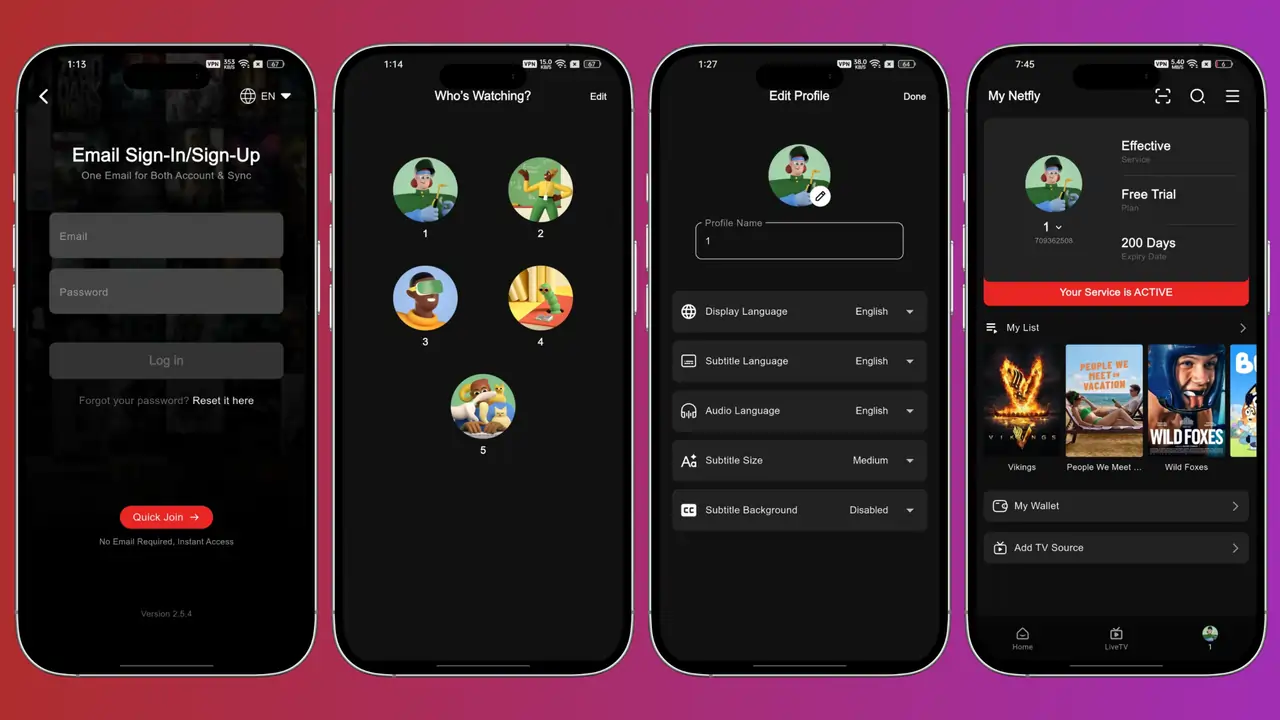
- But here comes the interesting part. The method of creating one on Netfly is quite straightforward.
- Launch the Netfly app and click on the profile icon at the bottom right of the screen.
- Tap on the ‘Quick Join’ option, which allows the user to open an account without even logging in.
The Netfly app allows a maximum of 5 guest accounts on the app, with each account having a separate ID, personalisation, and movie and series audio language, subtitle font size and position on the screen, parental locks, and many more features. The user can set up different names for the guest profiles and add pictures from the app stock as well, which will prevent any confusion for later stages.
How to Use Netfly to Watch Movies & Live TV Shows?
The Netfly application is a free movie streaming app that requires no fees to play the content on the database, which is quite huge when compared to premium OTT platforms. One can find hundreds and thousands of movies, shows, and anime from various genres and geographical boundaries. The user can navigate every category and watch any film they feel like watching. Besides cinema, Netfly also offers a list of live TV channels, which mainly consists of News and Sports across the globe. The live broadcasts provide time-to-time updates from across the planet and sports events, both major and minor ones.
The user can stream these on the app itself with the support of the media streamer of Netfly itself. They can even choose the pixel resolution, or in other words, picture quality, from the settings shown on the streamer itself. They can even surf through the subtitle files provided and select the language and sync it up with the video for better understanding of the dialogue and the movie plot.
Customize Video Quality and Subtitles to Fine-Tune Viewing
The user can avail the option for customizing the picture quality and subtitles on the display according to his or her preference. Netfly has a media streamer integrated within its system, thereby making it easier to play the content without being dependent on any external streaming services.
The subtitles come in as a package with a few more languages, such as Portuguese, Spanish, Arabic, etc., other than English. The user can even adjust the position and size of the subtitles. Apart from these, the Netfly app database has a wide variety of content, spanning from regional to international film industries. Along with that, the app also provides news and sports channels from different parts of the world, thereby keeping people aware of any major and minor happenings around the planet.
The developers have put in every intricate configuration that can increase the engaging power for the audience. Netfly has the entire settings part filled with streaming services customization that enables the viewers to personalise their preferred audio language and video resolution. The app not only focuses on catering to cinema and live television channel services, but also focuses on helping the spectators have a full enjoyment on the app and its content.
What People Say About Netfly?
The user experience on the app is so far better than on any other apps, as on Netfly, it is hassle-free to use the app and only provides the important features to control their streaming service. The viewers can check the picture resolution on their device display and can even adjust it according to their comfort.
Conclusion
Overall, we can say that Netfly is a unique app that allows the user to channel their preferences on any of the accounts that they can create on the app. Even though the app requires a sign-up for a free permanent account, the audience can open up more than a single guest account, whose validity is temporary but offers the same experience as the permanent account.